[0] We Multitask Like You Breathe: Why Vectors Are the New Binary for Built Environment Intelligence

Author: Dragos Milotin · Date: 2026-03-01 · Length: 14 min read
We Multitask Like You Breathe: Why Vectors Are the New Binary for Built Environment Intelligence

A practical introduction to vectors for AECO professionals — from pop-culture metaphor through pure-Python implementation to applied building-programme analytics and ISO 19650 alignment.

Vectors—not binary—are now the fundamental abstraction layer controlling what modern systems can perceive and express in the built environment. By representing buildings and programmes as ordered lists of measurable attributes, AECO professionals can apply simple linear algebra operations (addition for merging, similarity for comparables, subtraction for gap analysis) to solve real design and operational problems. Understanding this math is essential for anyone responsible for assets, because the next-generation tools managing tomorrow's built environment already think in vectors—and the professionals who do not will be left querying systems they cannot understand.


Read as:
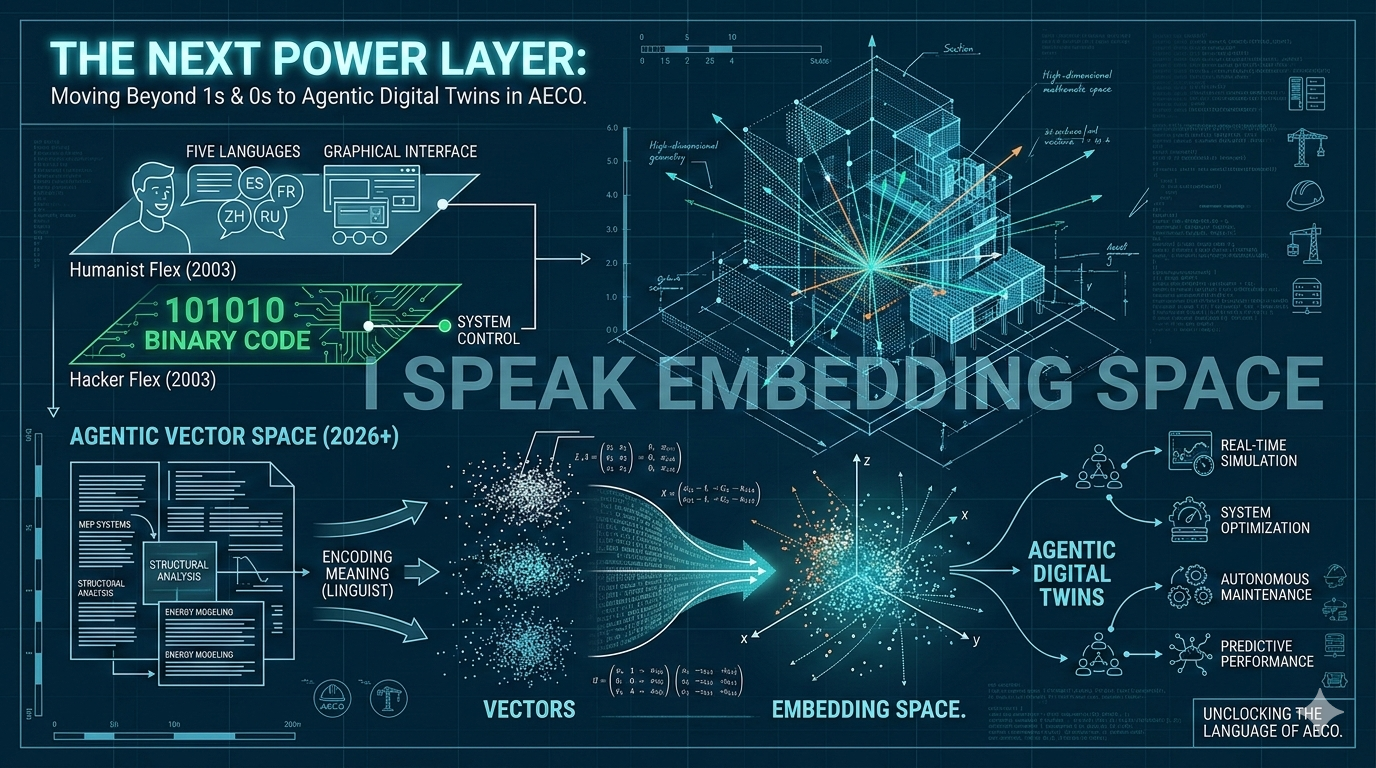
In the 2003 film *The Core*, hacker Rat delivers one of the best one-liners in techno-thriller history. When government scientist Zimsky flexes about speaking five languages, Rat fires back that he speaks one — the language of computers, "one zero one zero zero" — and that with it he could steal your money, your secrets, your whole life. Then the kill shot: **"We multitask like you breathe. I couldn't think as slow as you if I tried."** In 2003, that boast landed because binary *was* the abstraction layer that separated machine whisperers from everyone else. If you understood what sat beneath the GUI, you controlled the system. Twenty-three years later, the landscape has shifted. The deepest abstraction layer is no longer ones and zeros — it is **vectors**: dense numerical representations that encode meaning for text, images, geometry, sensor streams, and entire building programmes. This article is a practical introduction to vectors for professionals in Architecture, Engineering, Construction, and Operations (AECO). No PhD required — just a willingness to see buildings as points in space and operations as arithmetic. We will start with the pop-culture metaphor, ground it in linear algebra fundamentals with runnable Python, and finish with applied examples that turn real built-environment questions into vector operations you can execute today.
## Intro: From Binary to Vectors — What Changed In the 2003 film *The Core*, a hacker character named Rat delivers a memorable moment. When a government scientist boasts about speaking five languages, Rat fires back that he only speaks one — the language of computers, "one zero one zero zero" (binary) — and that with it he could steal your money, secrets, and entire life. His knockout line: **"We multitask like you breathe. I couldn't think as slow as you if I tried."** Rat's boast resonated in 2003 because binary truly was the hidden layer separating the people who controlled computer systems from everyone else. If you understood 1s and 0s beneath the user interface, you controlled the machine. But twenty-three years later, that has shifted fundamentally. The deepest abstraction layer is no longer binary — it is **vectors**: dense lists of numbers that encode meaning for text, images, 3D building geometry, sensor data, and entire space programmes. This article is a practical introduction to vectors for professionals in Architecture, Engineering, Construction, and Operations (AECO) — including commercial real estate, asset management, and digital twin workflows. You do not need a math PhD — just a willingness to see buildings and spaces as points in numerical space, where you can ask questions using simple arithmetic. We will start with a relatable metaphor, show you working Python code you can run today, and finish with applied examples: comparing building programmes, analyzing portfolio assets, and understanding how modern AI tools actually work under the hood. By the end, you will see that the math for comparing two coffees is identical to the math for comparing two buildings.
## Vector Intelligence Is Reshaping Built Asset Management The technology landscape controlling how buildings are searched, compared, valued, and operated has fundamentally shifted. Where binary code once represented the deepest layer of system control, **vector representations** now encode meaning for building geometry, operational performance, portfolios, and market comparables. For commercial real estate, construction, and technology leaders, this shift has immediate strategic implications: organizations that build fluency in vector-based analysis will gain competitive advantage in asset search, portfolio benchmarking, predictive maintenance, and digital twin deployment. This brief is a practical introduction to vectors for decision-makers in AECO (Architecture, Engineering, Construction, Operations). No advanced mathematics required—just an understanding that buildings can be represented as points in space and compared through computational means. We will ground the concept in business-relevant examples, map it to your existing information frameworks, and demonstrate concrete ROI opportunities in asset management, project delivery, and digital transformation.

[1] From Binary to Vectors

### The abstraction stack, then and now Rat's "101010" was shorthand for *owning the core abstraction layer of the era*. Binary sat beneath every high-level language, every operating system, every network protocol. If you were fluent there, you could reach through the stack and touch the machine directly. Today, that deepest layer has moved: 1. **Transformer embeddings** — dense vectors that encode semantic meaning for text, images, audio, and 3D geometry. They power search engines, chatbots, recommendation systems, and increasingly, building information retrieval. 2. **Pretrained model weights** — the numerical parameters that embody capabilities like language understanding, code generation, and perception. These weights *are* the learned knowledge of a foundation model, compressed into billions of floating-point numbers. 3. **Data and feature pipelines** — the flows that turn messy reality (sensor readings, point clouds, BIM exports, planning submissions) into the numeric form that models actually consume. If "five languages" was Zimsky's flex and "101010" was Rat's, then **"I speak embedding space"** is the modern equivalent. And in the AECO industry, far too few people are learning this language. ### The societal shift it encodes The original contrast in the film was *polyglot humanist* versus *machine-native mathematician*. Today the stack looks more like: - **Human languages** → prompts, UX, and surface-level interaction with AI systems. - **Machine language (binary)** → infrastructure plumbing, mostly abstracted away by compilers and runtimes. - **Model space (vectors and weights)** → the new substrate where power concentrates, because it determines what all higher layers can express or even imagine. If you restaged that recruitment scene now, Rat would not brag about 1s and 0s. He would brag that with the right models, embeddings, and data pipelines, he can *shape what the systems everyone relies on perceive as true or relevant*. In the built environment, that means shaping how buildings are searched, compared, valued, and operated.
## The Abstraction Stack: What Moved Rat's "101010" was shorthand for controlling the **core abstraction layer** of his era. Binary sat beneath every high-level software language, every operating system, every network. If you spoke binary, you could reach through the entire stack and control the machine directly. Today, the deepest layer has shifted. The new core consists of three things: **1. Embeddings** — These are dense vectors (ordered lists of numbers) that capture meaning. A transformer embedding might represent a building programme, a design proposal, or a regulatory requirement as a list of 768 numbers. These numbers are learned by AI models and are not human-readable, but they preserve meaning: two similar buildings will have embeddings that are numerically close. **2. Model weights** — The numerical parameters inside foundation models (like ChatGPT, Claude, or specialized construction AI). Billions of floating-point numbers that embody learned knowledge: what a well-designed office looks like, how mechanical systems interact, whether a floor plan is efficient. These numbers *are* the knowledge. **3. Data pipelines** — The automated flows that turn messy reality (BIM exports, sensor readings, planning documents, property records) into the numeric form that models actually consume. In construction, this might mean converting a 3D model into spatial vectors, or turning compliance checklists into semantic embeddings. If speaking five languages was the 2003 power move, and speaking binary was Rat's equivalent, then **"I speak embedding space"** is the 2026 equivalent in AECO. And today, most built-environment professionals have no exposure to this language. ### What This Shift Means Practically The original contrast was between a polyglot humanist and a machine-native hacker. Today it maps differently: - **Human languages** — what you type into ChatGPT, Slack, your CAD software. - **Machine plumbing (binary)** — the infrastructure that computers need internally. It is mostly invisible now because compilers handle it for you. - **Model space (vectors)** — the new place where power concentrates. It determines what AI systems can recognize, search for, recommend, and decide upon. If we restaged that *Core* scene today, Rat would not brag about 1s and 0s. He would say: **"With the right embeddings and data pipelines, I can shape what these systems perceive as similar, relevant, or valuable."** In construction and real estate, that means shaping how buildings are searched, compared, valued, and managed across their lifecycle.
## The New Control Layer: From Binary to Embedding Space Historically, technical advantage came from understanding computer systems at their lowest level—binary code. Today, the advantage lies in the next abstraction layer: **embedding space**, where dense numerical representations encode meaning for text, geometry, sensor data, and entire building programmes. This shift concentrates power in three areas: 1. **Semantic Search and Discovery** — Vector embeddings power the tools that locate assets, match portfolio candidates, and identify compliant projects faster and with greater precision than traditional text or metadata search. 2. **Predictive Intelligence** — Foundation models compress years of domain knowledge into numerical representations. These weights determine what analysis capabilities (compliance checking, maintenance prediction, value assessment) your systems can perform. 3. **Data Pipeline Authority** — How buildings, assets, and operational data are converted into vectors determines what insights are discoverable and what remains hidden. **Strategic implication**: The organizations that control these pipelines—understanding how data becomes intelligence—will own the competitive advantage in automated asset comparison, risk assessment, and portfolio optimization.

[2] What Is a Vector?

### Three ways to see the same thing A vector is simultaneously: - **Geometric** — an arrow with direction and length, rooted at an origin. - **Algebraic** — an ordered list of numbers: `[3, 4]`, `[60, 120, 0, 65]`. - **Abstract** — anything that can be scaled and added while obeying a small set of rules (the vector space axioms). The third view is the one that matters for BE Intelligence. A building, a coffee recipe, a sensor time-series, or a planning submission can all be represented as an ordered list of measurable attributes. Once it *is* a vector, every operation from linear algebra becomes a question you can ask and answer computationally. ### The two fundamental operations Everything in linear algebra rests on two primitives: **Addition** `u + v` — place two arrows head-to-tail. In programme terms: merge the space programmes of two buildings into one combined development. **Scalar multiplication** `λv` — stretch or shrink the arrow. In programme terms: apply a density uplift (`1.3 × tower_a`) or a reduction factor. From these two, every other operation — dot product, projection, decomposition, matrix multiplication — is derived. ### Dot product, magnitude, and angle The **dot product** `u @ v = Σ uᵢvᵢ` measures overlap between two vectors. Large positive value means both vectors are heavy in the same dimensions. Zero means they are orthogonal — no shared character at all. **Magnitude** `‖v‖ = √(Σ vᵢ²)` is the length of the arrow — a single number capturing overall intensity across all dimensions. Pythagoras, generalised to any number of dimensions. **Angle** `θ = arccos(u·v / ‖u‖‖v‖)` normalises the dot product so that scale drops out and only *profile shape* remains. This is cosine similarity — the backbone of every recommendation engine, every building comparables tool, and every embedding-based search system in production today.
## What Is a Vector? Three Ways to See the Same Thing A vector is simultaneously three things. All three views are correct; they just highlight different uses: **Geometric view** — An arrow with a direction and length, starting from an origin point. Useful for visualizing relationships in space. A building programme vector would point from the origin toward a region of space that represents "office buildings with good parking." **Algebraic view** — An ordered list of numbers, like `[3, 4]` or `[4500, 800, 120, 200]`. This is how a computer actually stores and manipulates a vector. The first number is the first dimension, the second number is the second dimension, and so on. **Abstract view** — Anything that can be added together and scaled while obeying simple mathematical rules (called vector space axioms). In AECO, this is the view that matters: a building, a design option, a tenant mix, or a maintenance log can all be represented as an ordered list of measurable properties. Once it is a vector, all of linear algebra — the entire toolkit for comparing, combining, and analyzing numbers — becomes available. ### The Two Foundation Operations Every operation in linear algebra is built from two basics: **Addition** `u + v` — Mentally, place the tail of the second arrow at the head of the first arrow. Mathematically, add each component. In building terms: merge the space programmes of two sites into one combined masterplan. **Scalar multiplication** `λv` — Stretch or shrink the arrow by a number. Multiply every component by that number. In building terms: apply a density uplift to a programme ("1.3 times larger") or a cost reduction factor. Every other operation — comparison, similarity scoring, direction-finding — is built from these two primitives. ### Dot Product, Magnitude, and Angle **The dot product** `u @ v = u₁v₁ + u₂v₂ + ... + uₙvₙ` measures overlap. Multiply each dimension of one vector by the corresponding dimension of the other, then sum. A large positive number means both vectors are heavy in the same dimensions (similar character). Zero means the vectors are orthogonal — they have nothing in common. **Magnitude** `‖v‖ = √(v₁² + v₂² + ... + vₙ²)` is the length of the arrow — a single number that captures overall intensity. A building programme with magnitude 5,000 is "bigger" or "more intense" than one with magnitude 1,000, summarizing across all dimensions. **Angle (cosine similarity)** `θ = arccos(u·v / ‖u‖‖v‖)` is the angle between two vectors, normalized so that scale does not matter. This is the backbone of every building comparison tool in production today: **two buildings might differ in absolute size, but if their profiles are similar, they have a small angle between them**. This is how search engines and recommendation systems work. **Practical interpretation**: Dot product is biased toward big numbers. Angle treats all vectors fairly regardless of size. For portfolio analysis and asset comparison, angle (cosine similarity) is almost always what you want.
## Vectors as a Business Framework A vector is a structured representation of any object as an ordered list of measurable attributes. A building, a financial asset, or a portfolio can be represented as a vector—each dimension capturing a meaningful characteristic. Once an asset *is* a vector, every vector operation maps to a real business question: - **Similarity** — Which assets in my portfolio most closely match this target profile? (Comparables, benchmarking) - **Gap Analysis** — What is this asset missing versus our target programme or performance standard? - **Aggregation** — What is the combined impact of merging these programmes or portfolios? - **Scaling** — How does this asset perform under density changes, cost pressures, or regulatory updates? - **Ranking** — Where does this asset sit relative to peers on a composite intensity measure? These operations do not change whether you compare four attributes or four thousand. The math is identical; only the dimensionality grows.

[3] A Python Vector Primitive

### Why build a Vector class from scratch? NumPy and PyTorch exist. But understanding *what* a vector does — not just how to call a library — is the difference between using a tool and owning the abstraction. The implementation below is intentionally minimal and heavily documented: two classes, zero dependencies beyond the standard library. ### BaseVector + Vector: the design split A math primitive has two distinct concerns: 1. **What it IS** — storage, comparison, printing, iteration (`BaseVector`). 2. **What it DOES** — mathematical operations (`Vector`). Separating these means that when we later build `Matrix`, `Polynomial`, or `Tensor`, they inherit the data contract from `BaseVector` without inheriting `Vector`'s linear algebra, which may not apply. This is the Single Responsibility Principle applied to a type hierarchy. Key design decisions: - **`__slots__`** — memory-efficient; no per-instance `__dict__`. - **Immutability** — `__setattr__` blocked after construction; vectors are hashable and safe to share. - **`type(self)` factory** — all operations return the subclass type, not a hardcoded `Vector`, so inheritance works correctly. - **`@` operator (`__matmul__`)** — PEP 465, consistent with NumPy and PyTorch conventions. - **`magnitude` as `@property`** — it is an attribute of the vector, not an action you perform on it. - **`math.hypot`** — numerically stable magnitude computation without manual squaring and square-rooting. The full implementation is provided as a companion script (`vector.py`) and is runnable with `python vector.py` for immediate verification.
## Understanding Vectors: Why Code Matters Libraries like NumPy exist and can handle vectors of any size instantly. But there is a critical difference between *using* a library and *owning* the concept. When you write a Vector class from scratch, you understand what a vector fundamentally *is* — not just how to call a function. This knowledge matters because in your real work — comparing building programmes, analyzing asset portfolios, working with AI embeddings — you will need to understand what the numbers mean and what operations you can trust. The implementation below is intentionally simple: two Python classes, zero external dependencies, heavily commented. The goal is clarity over performance. ### The Design: BaseVector + Vector Separating concerns makes sense: **BaseVector** — handles storage, comparison, printing, and iteration. This is "what the vector *is*": a data container. **Vector** — adds the mathematical operations: addition, multiplication, dot product, magnitude, angle. This is "what the vector *does*". Why split them? Because when you later work with Matrices or other structures, they can inherit the storage contract from BaseVector without inheriting linear algebra operations that may not apply. This is clean design. ### Key Implementation Choices - **`__slots__`** — Memory-efficient. A building vector consumes less RAM. - **Immutability** — Once created, a vector cannot be changed. This makes vectors safe to share and cache. - **Operator overloading** — Use `@` (Python's matmul operator) for dot product, `*` for scaling. Same syntax as NumPy. - **`magnitude` as a property** — It is an attribute of the vector ("the vector's magnitude"), not an action you perform ("compute the magnitude"). - **Numerical stability** — Use Python's `math.hypot` for magnitude calculation instead of manual square-root to avoid floating-point errors. Companion script `vector.py` provides the full implementation and runs as-is with `python vector.py`. Copy it, modify it, break it intentionally. The goal is to make the concept yours before moving to production libraries.
## Implementation Is Achievable—With or Without Code While this article includes reference implementations in Python, the core insight is technology-independent: vector operations can be embedded in platforms (databases, BIM tools, portfolio management systems) without requiring teams to write code themselves. Vendors in the CRE and construction space are already integrating vector-based search and comparison into commercial offerings. The key is ensuring that any implementation you adopt operates with full transparency and audit trails—particularly where decisions about asset valuation, risk assessment, or compliance affect business value.

[4] The Coffee Example

### Your coffee is a vector Before touching buildings, consider something everyone understands: a cup of coffee described by four measurable attributes. ``` (espresso_ml, milk_ml, sugar_g, temperature_c) flat_white = [60, 120, 0, 65] cappuccino = [60, 60, 0, 65] sweet_latte = [30, 200, 10, 70] black_coffee = [240, 0, 0, 80] ``` Every vector operation maps to a real coffee question: **Addition** — combine two drinks. `flat_white + cappuccino = [120, 180, 0, 130]`. Not a real drink, but mathematically: merging two programmes is the same operation. **Scalar multiply** — scale a recipe. `2 × flat_white = [120, 240, 0, 130]`. Making coffee for two. Same proportions, double quantity. **Magnitude** — overall intensity. `‖flat_white‖ = 146`, `‖black_coffee‖ = 253`. Black coffee has higher intensity — more extreme in its dimensions. **Dot product** — similarity. `flat_white @ black_coffee = 19,600` scores higher than `flat_white @ cappuccino = 14,025` because temperature alone dominates at large values. This is exactly why **normalising matters**: raw dot product rewards scale. Angle (cosine similarity) is the fairer comparison. **Angle** — use-profile alignment. `flat_white` vs `cappuccino` → small angle, same character. `flat_white` vs `black_coffee` → large angle, completely different profile. **Subtraction** — gap analysis. `target - flat_white = [0, +30, 0, 0]` → you need 30ml more milk. That is it. In a planning brief: the gap is what the site is missing versus the target programme. The pattern is always the same: define your object as an ordered list of measurable attributes, pick the right operation, read the answer. The math is identical whether you are comparing coffees, buildings, or load cases.
## A Concrete Example: Coffee Recipes as Vectors Before we touch buildings, consider something everyone understands: a cup of coffee described by four measurable attributes. ``` (espresso_ml, milk_ml, sugar_g, temperature_c) flat_white = [60, 120, 0, 65] cappuccino = [60, 60, 0, 65] sweet_latte = [30, 200, 10, 70] black_coffee = [240, 0, 0, 80] ``` Now every vector operation answers a real question: **Addition — Combining recipes**: `flat_white + cappuccino = [120, 180, 0, 130]`. Not a drink you would make, but mathematically: merging the space programmes of two buildings follows the same logic. **Scalar multiplication — Scaling a recipe**: `2 × flat_white = [120, 240, 0, 130]`. Making coffee for two people. Same proportions, double quantities. In buildings: applying a density uplift. **Magnitude — Overall intensity**: `‖flat_white‖ ≈ 146`, but `‖black_coffee‖ ≈ 253`. Black coffee has higher magnitude — it is more extreme across its dimensions (more espresso, higher temperature). A single number summarizing complexity and scale. **Dot product — Raw overlap**: `flat_white @ black_coffee = 19,600`. Large number. `flat_white @ cappuccino = 14,025`. Smaller number. But raw dot product is misleading: it rewards scale. Black coffee's large temperature value dominates the calculation. **Angle (cosine similarity) — Profile alignment**: This is the fair comparison. `flat_white` vs `cappuccino` have a small angle (both are milk-forward, modest-temperature drinks). `flat_white` vs `black_coffee` have a large angle (completely different recipes). **This is why building comparison tools use angle, not raw dot product**. **Subtraction — Gap analysis**: `sweet_latte - cappuccino = [-30, +140, +10, +5]`. To turn a cappuccino into a sweet latte, you need 30ml *less* espresso, 140ml *more* milk, 10g sugar, and 5° more heat. In asset management: the gap is exactly what your portfolio is missing versus your target mix. ### The Key Insight The pattern is always the same: express your object as an ordered list of measurable properties, pick the right operation, read the answer. The math does not change whether you are comparing coffee recipes, building programmes, tenant mixes, or energy profiles. Only the meaning of the numbers changes.
## Comparing Assets: A Straightforward Example Consider a commercial asset defined by four measurable attributes: `(office_m2, retail_m2, residential_units, parking_bays)`. Asset A: `(4500, 800, 120, 200)` — mixed-use office tower Asset B: `(3800, 1200, 0, 150)` — retail-dominant commercial Asset C: `(0, 0, 0, 80)` — parking/logistics only Using vector operations: - **Merger**: Asset A + Asset B = combined 8,300m² office, 2,000m² retail, 120 residential units. Portfolio impact instantly quantified. - **Scaling**: 1.3 × Asset A applies a 30% uplift across all dimensions—the impact of approved density increases or renovations. - **Intensity**: A single composite score (`‖asset‖`) benchmarks overall scale across all dimensions, supporting portfolio-wide comparison. - **Similarity**: Two assets with high cosine similarity have aligned use profiles; low similarity means complementary programmes with limited overlap. - **Gap Analysis**: Asset A - Asset B = +700m² office surplus, −400m² retail deficit. Strategy-relevant instantly. The same operations work whether you compare assets, portfolios, or market segments.
[5] Built Environment Intelligence

### Buildings as vectors In Built Environment Intelligence, a building is not just geometry — it is a point in a high-dimensional space of measurable attributes. Once a building *is* a vector, every vector operation becomes a real question you can answer. Consider a space-programme vector with four dimensions: `(office_m2, retail_m2, residential_units, parking_bays)`. ``` tower_a = Vector((4500, 800, 120, 200)) # mixed-use office tower tower_b = Vector((3800, 1200, 0, 150)) # retail-heavy commercial warehouse = Vector((0, 0, 0, 80)) # pure logistics ``` **Programme merger (addition)**: `tower_a + tower_b` yields 8,300m² office, 2,000m² retail, 120 residential units, and 350 parking bays. Two adjacent plots, one combined development. **Density uplift (scalar multiply)**: `1.3 × tower_a` applies a 30% increase across every component — the planning authority's approved densification, computed in one line. **Programme intensity (magnitude)**: `‖tower_a‖ ≈ 4,634`, `‖warehouse‖ = 80`. A single number benchmarking overall programme scale across all dimensions. **Programme similarity (dot product)**: `tower_a @ tower_b = 30,610,000` (high overlap — both are mixed-use). `tower_a @ warehouse = 16,000` (almost nothing in common). **Use-profile alignment (angle)**: `tower_a` to `tower_b` → moderate angle, similar but not identical profiles. `tower_a` to `warehouse` → near 90°, orthogonal programmes with no shared character. **Programme gap analysis (subtraction)**: `tower_a - tower_b` reveals +700m² office surplus, −400m² retail deficit, +120 residential units, and +50 parking bays. Instantly quantified gaps between what exists and what is needed. The companion script (`be_vectors.py`) runs all of these operations using the same `Vector` class — no new code, just new meaning attached to the same numbers.
## Buildings and Portfolios as Vectors In Built Environment Intelligence and asset management, a building is not just geometry or a line item in a spreadsheet — it is a point in a high-dimensional space defined by measurable attributes. Once you represent a building *as* a vector, every vector operation becomes a real, answerable question. Consider a simple space-programme vector with four dimensions: ``` (office_m2, retail_m2, residential_units, parking_bays) tower_a = Vector((4500, 800, 120, 200)) # mixed-use office tower tower_b = Vector((3800, 1200, 0, 150)) # retail-heavy commercial warehouse = Vector((0, 0, 0, 80)) # pure logistics, no mixed use ``` ### Real Operations on Real Buildings **Programme merger (addition)**: If you are consolidating two adjacent development sites: ``` tower_a + tower_b = (8300 office, 2000 retail, 120 units, 350 parking) ``` One calculation tells you the combined programme. No spreadsheet juggling. **Density uplift (scalar multiplication)**: A planning authority approves a 30% densification on tower_a: ``` 1.3 × tower_a = (5850 office, 1040 retail, 156 units, 260 parking) ``` One operation scales every dimension uniformly. **Programme intensity (magnitude)**: A single number benchmarking the "size" of the entire programme across all dimensions: ``` ‖tower_a‖ ≈ 4,634 (large mixed-use development) ‖warehouse‖ = 80 (small, focused facility) ``` Useful for portfolio-level reporting: "Which of our assets are heavyweight developments?" **Programme similarity (angle/cosine similarity)**: How aligned are two buildings? Imagine you are evaluating a new acquisition: ``` Angle(tower_a, tower_b) = small angle (both mixed-use, similar profile) Angle(tower_a, warehouse) ≈ 90° (orthogonal — office-heavy vs pure logistics) ``` Small angle = candidates for portfolio clustering or cross-selling strategies. Large angle = completely different use cases. **Programme gap analysis (subtraction)**: What is missing from tower_a to match tower_b's profile? ``` tower_b - tower_a = (-700 office, +400 retail, -120 units, -50 parking) ``` Tower_a has too much office and not enough retail. Tower_b has the inverse problem. This automatically surfaces portfolio imbalances and market opportunities. ### From Manual Comparison to Systematic Analysis Without vectors, portfolio analysis requires manual side-by-side comparison: looking at spreadsheets, noting similarities, calculating gaps by hand. With vectors, all of these become one-line operations. As your portfolio grows from 5 assets to 50 to 500, the advantage becomes transformative.
## Applied Vector Intelligence in Asset and Portfolio Management Buildings and portfolios are not just geometric structures—they are points in a high-dimensional space of operational, financial, and strategic attributes. Once represented as vectors, standard operations unlock immediate business value: **Portfolio Benchmarking** — Compare each asset's programme composition against portfolio targets, peer groups, or market standards. Identify outliers, redundancies, and optimization opportunities in seconds. **Comparable Asset Discovery** — Search your portfolio or market data for assets matching specific profile criteria. More precise, faster, and more auditable than manual comparable selection. **Gap Analysis for Development** — Quantify exactly what a target site is missing versus ideal programme mix. Direct input to project scoping and feasibility. **Density and Value Optimization** — Model the impact of scaling operations (1.2× current capacity) or programme changes across multiple dimensions simultaneously. **Predictive Asset Matching** — Feed historical transaction data into vector embeddings to identify which asset profiles command premium valuations, yield higher occupancy, or generate superior operational efficiency.

[6] From Coffee to Embeddings

### Scaling from four dimensions to four thousand The coffee and building examples use 4-dimensional vectors where every component has a name you can read. Real-world embeddings — the kind that power semantic search, building comparables, and agentic digital twins — operate in hundreds or thousands of dimensions. The components no longer have human-readable labels; they are learned features that a model discovers during training. But the operations are identical. Cosine similarity between two 768-dimensional building embeddings uses the same angle formula as the coffee example. Programme gap analysis in a 50-attribute asset model uses the same subtraction. The math does not change — only the dimensionality and the source of the numbers. This is the bridge from the Python primitives in this article to production systems: 1. **Hand-crafted vectors** (4–50 dimensions, interpretable) — useful for benchmarking, planning comparisons, and teaching. Every component has a name. This is where you start. 2. **Learned embeddings** (256–4096 dimensions, latent) — generated by foundation models from text, geometry, or sensor data. Components are not individually interpretable, but distances and angles remain meaningful. This is where production search and recommendation live. 3. **Hybrid approaches** — concatenating hand-crafted features with learned embeddings to combine interpretability with the richness of latent representations. This is the emerging best practice in BE Intelligence platforms. The point is: if you understand what addition, dot product, and angle *mean* in 4D, you understand what they mean in 4,000D. The intuition transfers. The code transfers. Only `len(v)` changes.
## Scaling From Four Dimensions to Thousands The coffee and building examples use 4–10 dimensions where every component is human-readable: espresso, milk, parking bays, office space. Real-world applications in AECO often need hundreds or thousands of dimensions. A building might be described by 200+ attributes: floor-by-floor space types, energy systems, structural frame, façade properties, internal layout characteristics, and more. When you add AI embeddings (learned representations from language models or computer vision), you are routinely working in 768 to 4,096 dimensions. But here is the critical point: **the operations do not change**. Cosine similarity between two 768-dimensional building embeddings uses the exact same angle formula as two 4-dimensional coffee vectors. Merger (addition) of two building features works the same way. Gap analysis (subtraction) is identical. The math is universal. ### Why You Would Use Thousands of Dimensions **Hand-crafted vectors (4–50 dimensions)** — Every component has a name and meaning. Useful for benchmarking, planning comparisons, teaching, and auditable decision-making. This is where you start. **Learned embeddings (256–4,096 dimensions)** — Generated by AI models from building descriptions, images, floor plans, or sensor data. The individual components (dimensions 42, 157, 503, etc.) are not human-readable, but their relationships are mathematically meaningful. Two buildings with similar learned embeddings will be perceived as similar by the model. This is where production recommendation engines and automated comparison tools live. **Hybrid approaches** — Concatenate hand-crafted features ("this building is in London, 50,000 m², office-focused") with learned embeddings from a foundation model. This combines interpretability (you can audit the hand-crafted features) with the richness of learned representations (the model has seen millions of buildings and learned subtle patterns). ### The Practical Bridge If you understand dot product, magnitude, and angle in 4D, you understand them in 4,000D. The intuition transfers perfectly: - "These two buildings have a small angle" means "they are similar in character" - "Magnitude is very large" means "this asset or programme is complex or intensive" - "Gap analysis shows a deficit" means "the portfolio is missing this characteristic" The Python code scales too. A loop that works on a 4-dimensional vector works unchanged on a 4,000-dimensional embedding. `len(v)` changes; the logic does not. This is why understanding vectors at the foundation level is so powerful: it makes the production systems transparent to you.
## Scaling From Interpretable Vectors to Enterprise AI Hand-crafted vectors with a few dozen interpretable dimensions (like the building programme example) are useful for strategic analysis and education. Production systems operate in hundreds or thousands of dimensions—learned from training data on millions of buildings, transactions, or sensor streams. The progression works as follows: 1. **Structured Asset Vectors** (5–50 dimensions, fully interpretable) — office square footage, retail space, parking bays, etc. Useful for benchmarking and cross-portfolio analysis. Every number has a label and business meaning. 2. **Learned Embeddings** (256–4,096 dimensions, latent) — generated by AI models from BIM geometry, transaction history, operational performance, or market data. Individual dimensions are not human-readable, but distances and similarities reveal meaningful patterns: which assets perform similarly, which programmes are substitutable, which market segments will consolidate. 3. **Hybrid Systems** — combine hand-crafted features with learned embeddings. Interpretability where it matters (compliance, audit) meets predictive power where it counts (asset discovery, risk assessment). **Strategic implication**: As you move to production systems, ensure vendors provide visibility into how vectors are constructed and validated. The dimensionality increases, but transparency and auditability must not decrease.

[7] The ISO 19650 Connection

### Vectors and the information management framework ISO 19650 defines how information about built assets should be managed across their lifecycle — from inception through operation to end of life. At its core, the standard is concerned with ensuring that the **right information** reaches the **right people** at the **right time** in a **structured, auditable** way. Vectors intersect with this framework at several points: **Asset Information Models (AIM)** — ISO 19650-3 governs the operational phase where asset data is continuously maintained. When building attributes are represented as vectors, querying "which assets in my portfolio most closely match this target profile?" becomes a cosine similarity search — the same operation powering every modern semantic search engine, applied to structured asset data. **Information containers** — the standard organises information into containers with defined purposes. A vector representation of a building programme is itself an information container: a structured, versioned, comparable unit of data that can be exchanged, validated, and audited. **Common Data Environments (CDE)** — the centralised repository where project information lives. Vector databases (Pinecone, Weaviate, Milvus, pgvector) are the computational equivalent: they store high-dimensional representations and support the similarity queries that CDEs increasingly need as portfolios grow beyond what manual comparison can handle. **Level of Information Need** — ISO 19650 requires that information delivered matches the purpose for which it is needed. Vector dimensionality maps directly to this concept: a 4-component programme vector is a coarse Level of Information Need suitable for strategic comparisons; a 200-component vector with granular spatial, environmental, and operational attributes serves a detailed Level of Information Need for asset management decisions. The standard does not prescribe vectors, but the problems it addresses — structured comparison, retrieval, and lifecycle management of asset information — are precisely the problems that vector operations solve computationally.
## Vectors and Asset Information Management ISO 19650 is the international standard for managing information on built assets across their entire lifecycle: from early planning through construction to operations and eventual end-of-life. At its core, the standard ensures that **the right information reaches the right stakeholder at the right time in a structured, auditable format**. Vectors connect to this framework in several practical ways: **Asset Information Models (ISO 19650-3)** — During the operational phase, assets are continuously maintained and described in Asset Information Models (AIMs). When you represent a building or an asset as a vector (e.g., "floor area, occupancy type, energy rating, last maintenance date, condition state"), you can run vector operations to answer critical operational questions: "Which of my 500 assets most closely match this tenant profile?", "Which buildings are closest to this design benchmark?", "What is the gap between my current portfolio and my strategic target?" These are cosine similarity queries — the same operation that powers Google's search engine, applied to structured asset data. **Information Containers as Vectors** — ISO 19650 organizes information into containers with defined purposes and audiences. A vector representation of an asset is itself a structured, versioned information container: comparable, exchangeable, and auditable. You can version it, store it in your Common Data Environment, and trace its evolution. **Common Data Environments (CDE)** — The standard's central repository where all project and asset information lives. Vector databases (Pinecone, Weaviate, Milvus, pgvector) are the computational equivalent: specialized storage for high-dimensional vectors that support fast similarity queries. As your asset portfolio grows, a vector database becomes essential infrastructure — it lets you search "find similar assets" instead of manually comparing spreadsheet rows. **Level of Information Need** — ISO 19650 requires that the information delivered match the purpose. This maps directly to vector dimensionality: a 4-component programme vector is a coarse Level of Information Need for strategic decisions ("Is this asset in our target market?"). A 200-component vector with granular spatial, environmental, regulatory, and operational attributes serves a detailed Level of Information Need for asset management and compliance decisions ("Which systems need upgrade? What are the maintenance risks?"). ### The Standards Alignment ISO 19650 does not mandate vectors. But the problems it solves — structured asset information, reliable comparisons across portfolios, lifecycle-wide auditability — are exactly what vectors make computationally tractable. As your organization scales beyond manual processes, vectors become the natural language for implementing the standard.
## Alignment With Information Governance Standards ISO 19650 mandates that the right information reaches the right decision-maker at the right time, with full auditability. Vector-based systems directly support this mandate: **Structured Asset Comparison** — Representing assets as vectors transforms "which buildings match our investment thesis?" into a precisely defined, auditable query—the foundation of defensible acquisition and portfolio decisions. **Information Lifecycle Management** — Vector databases are computational equivalents of ISO 19650 Common Data Environments: they store asset information in a queryable, version-controlled, immutable form, ensuring governance and traceability. **Level of Information Need** — Vector dimensionality directly maps to LOIneed: a 5-component strategic vector for board-level decisions; a 100+ component operational vector for asset management teams. The framework naturally scales decision support from high-level strategy to operational detail. **Continuous Asset Assessment** — As your portfolio evolves, vector representations can be updated and re-scored against strategic objectives, creating a dynamic (not static) alignment mechanism between assets and organizational goals. These capabilities do not conflict with ISO 19650; they operationalize its intent at the scale and speed modern portfolios demand.

[8] Why AECO Needs This

### The fluency gap The AECO industry is not short of data. BIM models, IoT sensor streams, planning submissions, energy performance certificates, and maintenance logs generate vast quantities of structured and semi-structured information. What the industry lacks is **vector fluency** — the ability to represent that data as high-dimensional points and use linear algebra to extract operational intelligence from it. This matters because the next generation of built-environment tools — semantic search across asset portfolios, automated compliance checking, predictive maintenance, generative design optimisation, and agentic digital twins — all operate on vectors under the hood. If you cannot read the abstraction layer, you cannot audit it, improve it, or even understand when it is wrong. Rat's taunt still applies: **"I couldn't think as slow as you if I tried."** The systems that will manage tomorrow's built environment are already thinking in vectors. The question is whether the professionals responsible for those assets will learn the language or be left querying surfaces they do not understand. The good news: the on-ramp is gentler than it looks. A 4-dimensional coffee vector, a `Vector` class with no dependencies, and a willingness to see buildings as points in space. That is enough to start. The math scales; the intuition transfers; and the Python you write today will be the same Python that talks to embedding APIs tomorrow. The journey from "five-language linguist" to "binary linguist" to "vector and linear algebra linguist" is the progression this series is exploring. Not because linear algebra is fashionable, but because it is the language the machines already speak — and in the built environment, we need more people who can understand what they are saying.
## Why This Matters for AECO: The Coming Fluency Gap The construction and real estate industry has more data than ever: BIM models, IoT sensor streams, regulatory filings, energy certificates, maintenance logs, market comps, compliance checklists. Yet the industry is largely **data-rich and insight-poor**. Why? Because the tools for extracting actionable intelligence from that data are advancing faster than the industry is learning them. The next generation of built-environment tools — semantic search across asset portfolios, automated compliance checking, predictive maintenance systems, generative design optimization, and agentic digital twins — all operate on vectors. If you cannot read that abstraction layer, you cannot: - **Audit the AI**: "Why did it recommend this asset over that one? What is the algorithm actually comparing?" - **Improve it**: You cannot tune or customize a system you do not understand. - **Spot errors**: If the comparison algorithm is wrong, it will produce confident-looking results that are quietly misleading. Rat's challenge from 2003 still applies: **"I couldn't think as slow as you if I tried."** The systems managing tomorrow's buildings are already thinking in vectors — embeddings, similarity metrics, learned representations. The question is whether the professionals responsible for those buildings will understand the language, or will be reduced to querying surfaces they do not control. ### The Good News: The Ramp Is Gentler Than It Looks You do not need a math PhD to build vector fluency. You need: 1. **A simple example** — A 4-dimensional coffee vector or a building programme vector. 2. **Basic operations** — Addition, multiplication, dot product, angle. 3. **Working code you can run** — The companion `vector.py` script. 4. **A willingness to see your buildings as points in space** — The conceptual leap, not the math. Once you own that foundation, scaling to thousands of dimensions, production embeddings, and AI-driven analysis becomes intuitive. The math stays the same. Only the dimensionality changes, and the meaning you attach to the numbers. **This is not a "nice to have" skill.** In digital twins, portfolio optimization, regulatory compliance automation, and asset search — areas driving investment across commercial real estate, construction, and facilities management — vector fluency is becoming table stakes. The professionals and organizations that learn this language first will have a decisive advantage in speed, accuracy, and confidence.
## Competitive Risk and Strategic Opportunity The next generation of asset management tools—semantic search across global portfolios, automated risk assessment, predictive maintenance, and AI-driven asset optimization—all operate on vector intelligence under the hood. Organizations that build internal competency in vector-based analysis gain three immediate advantages: 1. **Vendor Independence** — Understanding how vectors work prevents over-reliance on proprietary tools. You can audit claims, negotiate terms, and migrate between platforms. 2. **Decision Speed and Quality** — Portfolio screening, comparable selection, and trend identification that once took weeks can execute in hours. Risk assessment becomes continuous, not annual. 3. **Talent Attraction and Digital Capability** — Technology-forward decision-makers expect their tools to reflect best practices in search, comparison, and AI. Vector fluency signals organizational maturity in digital transformation. **The risk**: The teams and organizations that treat vectors as a passing trend—rather than the foundation of next-generation asset intelligence—will find themselves dependent on vendors they cannot audit and tools they cannot improve. In commercial real estate, construction, and asset management, that dependence carries real financial and reputational cost.

[9] Conclusion

Rat was right about one thing: the person who controls the deepest abstraction layer controls the system. In 2003, that layer was binary. In 2026, it is vectors — dense numerical representations that encode meaning, similarity, and structure for everything from natural language to building programmes. This article introduced vectors through three lenses: a pop-culture metaphor (The Core's "101010" as the precursor to embedding space), a from-scratch Python implementation (BaseVector + Vector, designed for inheritance and immutability), and applied examples (coffee recipes and building programmes as vector operations). The core takeaway for AECO professionals: **the math that compares two coffees is the same math that compares two buildings, two portfolios, or two urban masterplans**. Addition is programme merger. Scalar multiplication is density scaling. Dot product is similarity. Angle is profile alignment. Subtraction is gap analysis. The operations do not change — only the dimensionality and the domain meaning of the numbers. If you are starting the journey from human languages to vector space, the companion scripts (`vector.py` and `be_vectors.py`) are your first runnable steps. Copy them, modify them, break them. The goal is not to replace NumPy — it is to own the intuition so that when you do use NumPy, PyTorch, or an embedding API, you know exactly what the numbers mean. **"We multitask like you breathe."** Time to learn the language.
## Conclusion: Learn the Language Rat was correct about one thing: whoever controls the deepest abstraction layer controls the system. In 2003, that layer was binary — 1s and 0s beneath the GUI. In 2026, it is vectors — dense numerical representations that encode meaning for everything from natural language to building programmes to sensor streams. We have covered three views of vectors: 1. **The metaphor** — From Rat's "101010" and 2003's binary fluency to modern embedding space as the new abstraction layer controlling AI behavior. 2. **The implementation** — A from-scratch Python Vector class, designed for clarity and inheritance, showing that vectors are not magic: they are data containers plus linear algebra operations. 3. **The applications** — Coffee recipes, building programmes, portfolio analysis, asset management. The same operations (addition, scalar multiplication, angle) answer different questions in different domains. ### The Central Insight **The math for comparing two coffees is identical to the math for comparing two buildings, two portfolios, or two urban strategies.** Addition is programme merger. Scalar multiplication is density scaling. Dot product (normalized as angle) is similarity. Subtraction is gap analysis. Once you see that pattern, linear algebra stops being an abstract subject and becomes a practical toolkit for the decisions you make every day in construction and real estate. ### Next Steps If you are starting this journey, the companion scripts (`vector.py` and `be_vectors.py`) are your first concrete footholds: - Copy them. - Modify them with your own data (actual building programmes, portfolio attributes, asset metrics). - Break them intentionally to understand what happens. - Run them locally with `python vector.py`. The goal is not to replace NumPy, PyTorch, or specialized vector databases. It is to **own the intuition** so that when you do use those tools — in search systems, recommendation engines, compliance checkers, or generative design platforms — you know exactly what the numbers mean and can audit the results. **"We multitask like you breathe. I couldn't think as slow as you if I tried."** The machines are already speaking vectors. Time to learn their language.
## Moving Forward: Three Actions for Leadership **1. Build Awareness** — Ensure your technology and asset management teams understand vectors not as a mathematical concept, but as the foundation of modern asset search, comparison, and portfolio intelligence. This is no longer optional context. **2. Audit Vendor Implementations** — If tools you use (portfolio management platforms, BIM systems, market data providers) reference AI, semantic search, or embeddings, ask how vectors are constructed, validated, and made auditable. Demand transparency. **3. Pilot Internally** — Begin with simple vector representations of your own assets (programme composition, performance metrics, market attributes). Use them for benchmarking and gap analysis. Learn the approach at small scale before depending on it for high-stakes decisions. The math underlying tomorrow's built-environment intelligence is not new—linear algebra has been foundational to engineering and operations for decades. What is new is the speed and scale at which vector operations now execute, and the power of learned embeddings to encode domain knowledge without explicit programming. **The opportunity**: Leadership in your industry will go to organizations that master this layer of abstraction—not by becoming mathematicians, but by building teams that understand how buildings become vectors, vectors become insights, and insights drive strategic value. That journey starts now.
Key Takeaways
- Vectors (dense numerical representations) have become the deepest abstraction layer in modern systems, replacing binary as the substrate that determines what AI systems perceive and express. - Any building, programme, or asset can be represented as an ordered list of measurable attributes, transforming architectural and engineering questions into vector operations: addition for programme merging, dot product for similarity, subtraction for gap analysis. - Vector fluency—understanding how addition, magnitude, angle, and dot product work—transfers directly from simple 4D hand-crafted vectors to complex 4000D learned embeddings used in production systems. - AECO professionals need vector literacy to audit, improve, and innovate in next-generation tools like semantic search, automated compliance, predictive maintenance, and agentic digital twins that operate on vectors under the hood. - The ISO 19650 information management framework aligns naturally with vector operations: vector databases provide the computational infrastructure for asset comparison and retrieval that the standard prescribes conceptually.